
|
Version |
Changelog |
Date |
Download |
|---|---|---|---|
|
1.0.0 |
Initial Release |
Application Version: 3.1.0
Compatible Firmware: Flexa Firmware min. v2.3.4 (click to download)
Device Compatibility: Barionet M44
Overview
The TSH202B MQTT Application provides industrial-grade temperature and humidity monitoring for Barionet M44 devices. It reads data from a Teracom TSH202B v3 sensor over the 1-Wire bus and publishes the values via MQTT. The application includes a built-in live status web page, automatic sensor discovery, and robust error handling.
Compatible Hardware
Primary Platform: Barionet M44 running Flexa Firmware v2.3.0 or later.
Sensor: Teracom TSH202B v3 (also compatible with TSH206v3 — same scratchpad format, sub-family code 0xFF).
Hardware Connection
The Barionet M44 does not provide a 3.3 V output. Power the sensor from the 5 VDC (VBUS) of the USB connector. The TSH202B accepts a supply of +4.0 to +5.5 V, so 5V is within specification.
|
NOTE: A 4.7 kΩ pull-up resistor is mandatory between the DATA line and 5VDC. Without it the 1-Wire bus cannot pull back to HIGH between transactions and communication will fail. NOTE: To provide 5VDC the USB port must be activated with Enable USB at Boot option. |
Connect it to the Barionet M44 as follows.
|
TSH202B Pin |
Barionet M44 Terminal |
Wire Colour |
|
VCC |
5 V (VBUS, USB connector) |
Red |
|
DATA |
1-Wire input |
White |
|
GND |
GND |
Black |
Wiring Notes
-
Keep cable length under 10 m for reliable operation without a line driver.
-
After wiring, verify the sensor appears in sysfs: ls /sys/bus/w1/devices/ should show an entry starting with 01-.
-
If nothing appears, check that the w1_gpio kernel module is loaded: lsmod | grep w1
Installation Process
Installing the TSH202B MQTT Application requires uploading a package file directly to your Barionet device through its web interface. This process is straightforward but requires careful attention to ensure proper installation.
NOTE: If your Barionet M44 is already running an application you must RESET TO DEFAULTS before proceeding and installing a new one.
Step 1: Access the Device Web Interface
-
Open your web browser and navigate to your Barionet device's IP address
-
Enter your administrator username and password when prompted
-
Wait for the main interface to load completely before proceeding
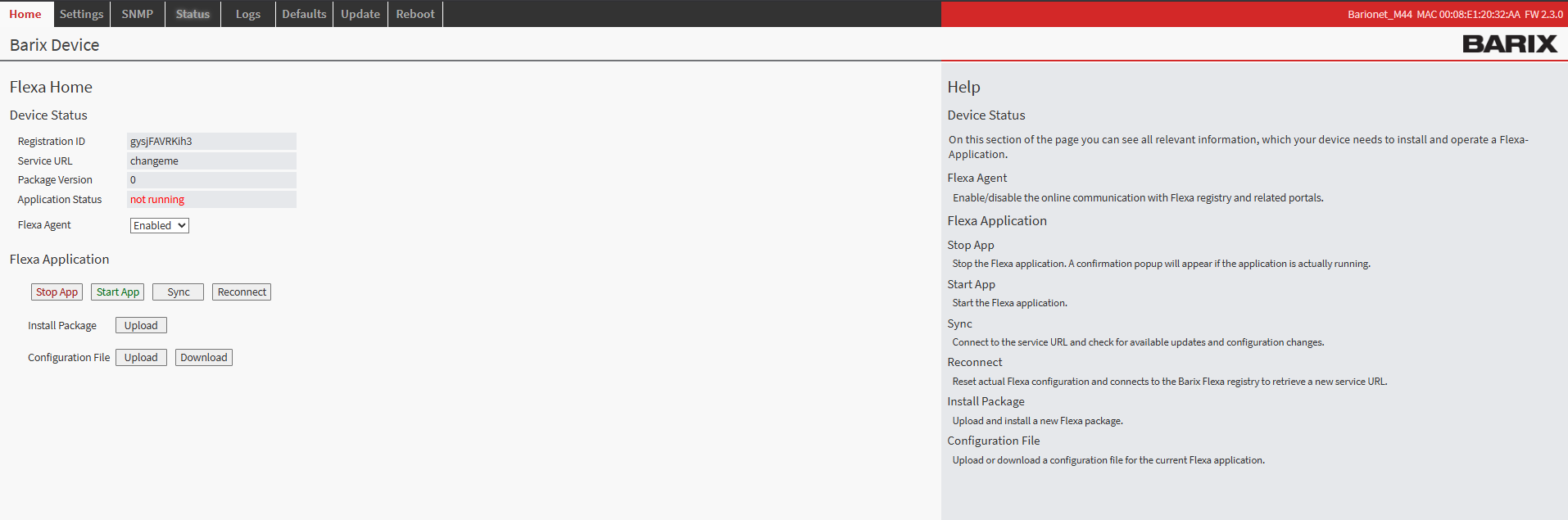
Barionet M44 User Interface
Step 2: Upload the Application Package
-
Navigate to the HOME tab in the main menu
-
Locate the "Upload" button next to “Install Package” within the page
-
Click the file selection button and browse to the “package.zip” which was downloaded from this page
-
Choose an appropriate version number for tracking purposes (this can be any number you prefer for identification)
-
Click the UPLOAD button to begin the installation process
Step 3: Device Reboot and Verification
After the upload completes, your Barionet device will automatically initiate a reboot sequence. This reboot is necessary to properly integrate the new application into the system. The reboot process typically takes 30..40s
-
Wait for the device to complete its reboot cycle
-
Reconnect to the web interface using the same IP address and credentials
-
Navigate back to the HOME tab
-
Verify that the TSH202B MQTT application appears with a status of "running"
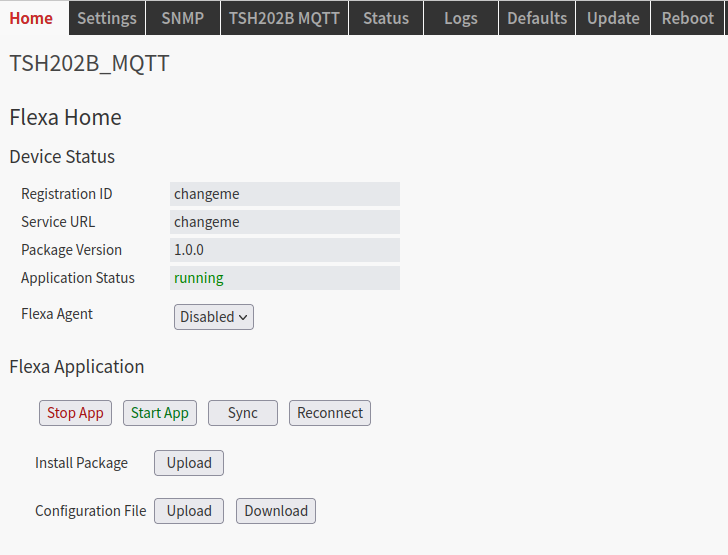
Barionet M44 Home Tab
Configuration Overview
Once successfully installed, the TSH202B MQTT application configuration interface becomes available through the TSH202B MQTT tab in your device's web interface. This dedicated configuration page provides access to all settings necessary to establish communication between devices and configure input-to-relay mappings.
The configuration system is designed to be intuitive while providing the flexibility needed for complex installations. Each setting includes helpful descriptions and validation.
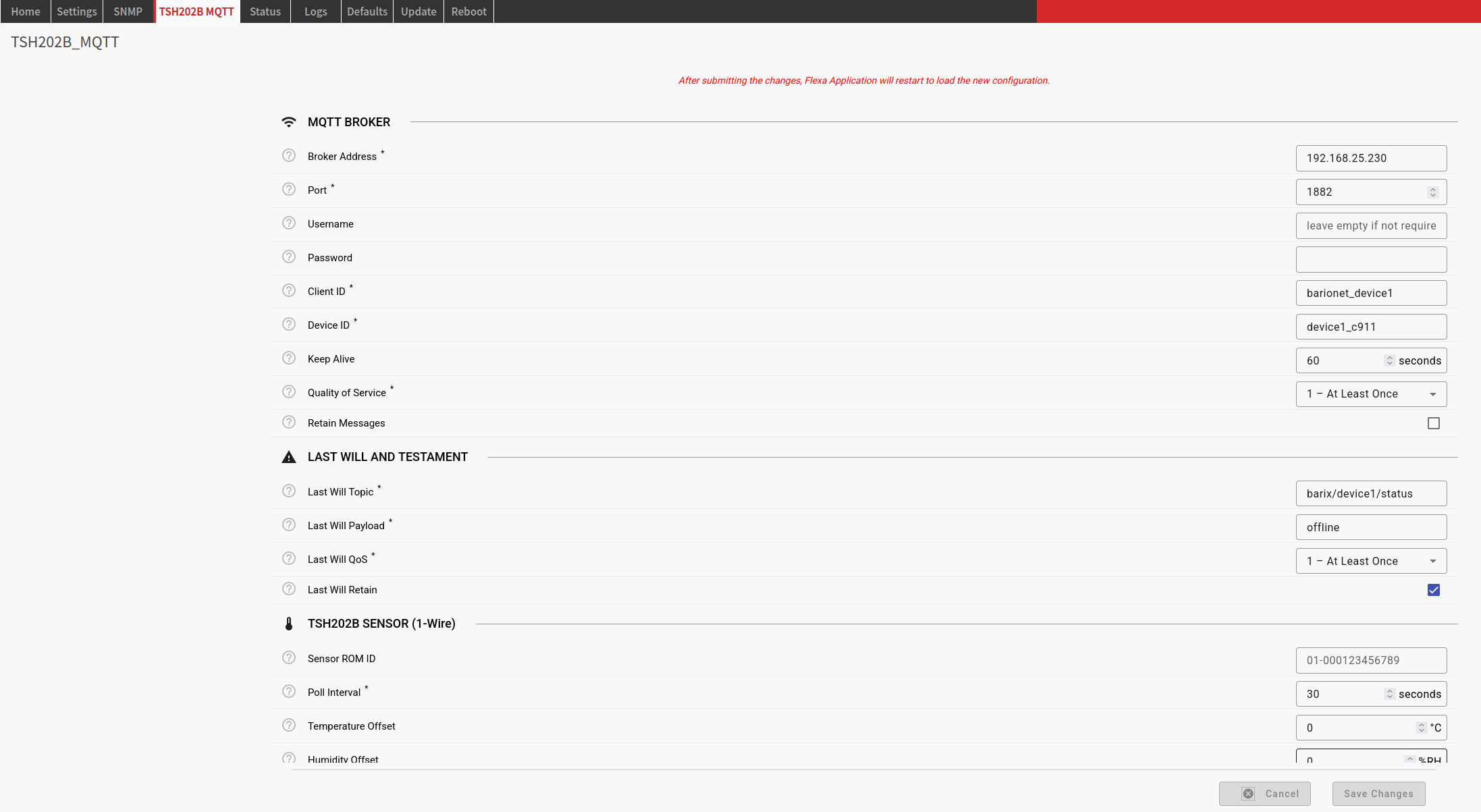
TSH202B MQTT Configuration Tab
MQTT Broker
Required Parameters
|
Parameter |
Description |
Example |
|
mqtt_broker |
MQTT broker IP address or hostname |
192.168.1.100 |
|
|
|
|
|
mqtt_port |
MQTT broker port number |
1883 |
|
|
|
|
|
mqtt_client_id |
Unique MQTT client identifier |
barionet_tsh202b |
|
|
|
|
|
mqtt_device_id |
Device ID used in MQTT topics |
device1 |
Optional Parameters
|
Parameter |
Default |
Range |
Description |
|
|
|
|
|
|
mqtt_username |
null |
|
MQTT authentication username (leave empty if not required) |
|
|
|
|
|
|
mqtt_password |
null |
|
MQTT authentication password |
|
|
|
|
|
|
mqtt_keepalive |
60 |
10–3600 |
MQTT connection keepalive interval (seconds) |
|
|
|
|
|
|
mqtt_qos |
1 |
0, 1, 2 |
Quality of Service level for MQTT messages |
|
|
|
|
|
|
mqtt_retain |
true |
|
Retain sensor readings on the broker |
Last Will and Testament Parameters
|
Parameter |
Default |
Description |
|
|
|
|
|
mqtt_last_will_topic |
barix/{device_id}/status |
Topic for Last Will message |
|
|
|
|
|
mqtt_last_will_payload |
offline |
Payload for Last Will message |
|
|
|
|
|
mqtt_last_will_qos |
1 |
QoS level for Last Will message |
|
|
|
|
|
mqtt_last_will_retain |
true |
Retain flag for Last Will message |
TSH202B Sensor
|
Parameter |
Default |
Range |
Description |
|
|
|
|
|
|
sensor_rom_id |
empty |
|
1-Wire ROM ID (e.g. 01-000123456789). Leave empty for auto-detect. |
|
|
|
|
|
|
sensor_poll_interval |
30 |
1–3600 s |
How often the sensor is read and values are published. |
|
|
|
|
|
|
sensor_temp_offset |
0.0 |
-20 to +20 |
Calibration offset added to every temperature reading (°C). |
|
|
|
|
|
|
sensor_hum_offset |
0.0 |
-20 to +20 |
Calibration offset added to every humidity reading (%RH). |
Status Web Page
|
Parameter |
Default |
Range |
Description |
|
|
|
|
|
|
status_server_enabled |
true |
|
Enable/disable the live status web page. |
|
|
|
|
|
|
status_server_port |
8090 |
1–65535 |
TCP port for the status web page. Access at http://<device-ip>:<port>/ |
Hardware
|
Parameter |
Default |
Description |
|
|
|
|
|
usb_enable_at_boot |
true |
Enable the Barionet M44 USB subsystem at startup by writing 1 to /sys/kernel/bm44/usb_enable. Required if USB-attached hardware (e.g. UX8 extensions) must be available. |
Logging
|
Parameter |
Default |
Options |
Description |
|
|
|
|
|
|
logging_level |
INFO |
DEBUG, INFO, WARNING, ERROR, CRITICAL |
Application log level |
|
|
|
|
|
|
logging_syslog_enabled |
true |
|
Enable/disable remote syslog logging |
|
|
|
|
|
|
logging_syslog_server |
localhost |
|
Remote syslog server IP address |
|
|
|
|
|
|
logging_syslog_port |
514 |
1–65535 |
Remote syslog server port |
Application
|
Parameter |
Default |
Range |
Description |
|
|
|
|
|
|
application_reconnect_delay |
5.0 |
1.0–300.0 |
Base delay for MQTT reconnection with exponential back-off (seconds) |
|
|
|
|
|
|
application_max_reconnect_attempts |
10 |
1–100 |
Maximum MQTT reconnection attempts before giving up |
|
|
|
|
|
|
application_health_check_interval |
300 |
10–3600 |
Interval between periodic health log messages (seconds) |
Status Web Page
The application includes a built-in HTTP server that serves a live auto-refreshing status page. It is available as soon as the application starts — even before the sensor is wired up, making it useful for diagnostics.
Access
http://<device-ip>:8090/
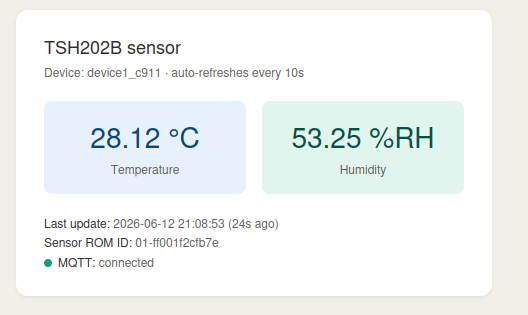
The page auto-refreshes every 10 seconds and displays:
-
Current temperature (°C)
-
Current relative humidity (%RH)
-
Last update timestamp and age
-
Sensor 1-Wire ROM ID
-
MQTT connection status
-
Last sensor error (if any)
JSON API
A machine-readable JSON endpoint is also available:
http://<device-ip>:8090/status.json
Example response:
{"temperature": 23.4375, "humidity": 60.0625, "rom_id": "01-000123456789",
"last_update": 1749730000, "error": null, "mqtt_connected": true}
MQTT Topics
The application implements a structured MQTT topic hierarchy based on the device ID configuration.
Topic Structure
All sensor topics follow the pattern:
barix/{device_id}/sensor/{measurement}
Where:
-
{device_id}: Value from the mqtt_device_id configuration parameter
-
{measurement}: temperature, humidity, or json
Device Status Topic
Online / Offline
Topic: barix/{device_id}/status
Direction: Application → MQTT Broker
|
Payload |
Meaning |
|
|
|
|
online |
Device is connected and operational |
|
|
|
|
offline |
Device is disconnected (Last Will and Testament) |
Sensor Topics
Temperature
Topic: barix/{device_id}/sensor/temperature
Payload: numeric string in °C to 4 decimal places, e.g. 23.4375
|
Characteristic |
Value |
|
|
|
|
Direction |
Application → MQTT Broker |
|
|
|
|
QoS |
Configurable (default: 1) |
|
|
|
|
Retained |
Configurable (default: true) |
|
|
|
|
Published |
After every successful sensor read |
Humidity
Topic: barix/{device_id}/sensor/humidity
Payload: numeric string in %RH to 4 decimal places, e.g. 60.0625
|
Characteristic |
Value |
|
|
|
|
Direction |
Application → MQTT Broker |
|
|
|
|
QoS |
Configurable (default: 1) |
|
|
|
|
Retained |
Configurable (default: true) |
|
|
|
|
Published |
After every successful sensor read |
JSON Combined
Topic: barix/{device_id}/sensor/json
A single retained message combining both readings plus metadata:
{"temperature": 23.4375, "humidity": 60.0625,
"unit_temp": "C", "unit_hum": "percent",
"timestamp": 1749730000, "device": "device1",
"sensor": "TSH202B", "rom_id": "01-000123456789"}
Topic Wildcards for Monitoring
|
Purpose |
Wildcard |
|
|
|
|
Monitor all device topics |
barix/device1/# |
|
|
|
|
Monitor all sensor readings |
barix/device1/sensor/+ |
|
|
|
|
Monitor JSON topic only |
barix/device1/sensor/json |
1-Wire Protocol Details
The TSH202B v3 follows the Teracom 1-Wire protocol specification (R1.12). On Linux the sensor is accessed via the w1 sysfs interface at /sys/bus/w1/devices/<rom_id>/rw.
Scratchpad Memory Layout
|
Byte |
Content |
Type |
|
|
|
|
|
BYTE 0 |
Temperature LSB |
|
|
|
|
|
|
BYTE 1 |
Temperature MSB |
Signed int16, LSB first — scale × 0.0625 → °C |
|
|
|
|
|
BYTE 2 |
Humidity LSB |
|
|
|
|
|
|
BYTE 3 |
Humidity MSB |
Unsigned int16, LSB first — scale × 0.0625 → %RH |
|
|
|
|
|
BYTE 4 |
User byte 1 |
|
|
|
|
|
|
BYTE 5 |
User byte 2 |
|
|
|
|
|
|
BYTE 6 |
RESERVED |
|
|
|
|
|
|
BYTE 7 |
RESERVED |
|
|
|
|
|
|
BYTE 8 |
CRC |
Dallas/Maxim CRC-8 (poly 0x31) |
Read Sequence
-
Skip ROM [CCh] + Convert [44h] — trigger measurement
-
Wait 800 ms for conversion to complete
-
Skip ROM [CCh] + Read Scratchpad [BEh] — read 9 bytes
-
Verify CRC-8 of bytes 0–7 against byte 8
-
Decode temperature (signed int16) and humidity (unsigned int16)
-
Multiply both by 0.0625 to obtain final values
Decoding Example
From Teracom specification R1.12, Appendix A:
|
Register |
Raw Hex |
Raw Decimal |
Calculated Value |
|
|
|
|
|
|
Temperature (BYTE1:0) |
0x01FB |
507 |
507 × 0.0625 = 31.6875 °C |
|
|
|
|
|
|
Humidity (BYTE3:2) |
0x03C1 |
961 |
961 × 0.0625 = 60.0625 %RH |
Sub-family code: 0xFF (verified at startup via Read Functional Register [93h]).
Monitoring and Logging
Log Levels
|
Level |
Description |
Use Case |
|
|
|
|
|
DEBUG |
Includes raw scratchpad bytes and MQTT publish details |
Development and troubleshooting |
|
|
|
|
|
INFO |
General operational messages |
Normal operation monitoring |
|
|
|
|
|
WARNING |
Sensor CRC errors, MQTT reconnects |
Production monitoring |
|
|
|
|
|
ERROR |
Sensor IO failures, MQTT errors |
Production alerts |
|
|
|
|
|
CRITICAL |
Sensor not found at init, config errors |
Emergency alerts |
Log Message Examples
Startup
INFO - Using config.json
INFO - USB subsystem enabled (wrote 1 to /sys/kernel/bm44/usb_enable)
INFO - TSH202B ready: ROM ID=01-000123456789 path=/sys/bus/w1/devices/01-000123456789
INFO - Status web page available at http://<device-ip>:8090/
INFO - MQTT connected
INFO - TSH202B MQTT application running
Normal Operation
INFO - TSH202B [01-000123456789]: temperature=23.4375°C humidity=60.0625%RH
DEBUG - Published barix/device1/sensor/temperature = 23.4375
INFO - Health check: MQTT connected=True sensor ROM=01-000123456789
Sensor Recovery
WARNING - Sensor CRC error (1): Scratchpad CRC mismatch: calculated=0x3A, received=0x9E
WARNING - 5 consecutive sensor errors — re-scanning 1-Wire bus
INFO - TSH202B detected: ROM ID=01-000123456789 path=/sys/bus/w1/devices/01-000123456789
No Sensor Connected
WARNING - TSH202B sensor not found on 1-Wire bus at startup. Check wiring
and that the w1 kernel module is loaded. Will keep retrying in the background.
WARNING - No TSH202B sensor detected on 1-Wire bus — retrying in 30s
Software Disclaimer
IMPORTANT:
This software application ("Software") is provided "AS IS" without warranty of any kind, express or implied, including but not limited to the warranties of merchantability, fitness for a particular purpose, and non-infringement. In no event shall the author, developer, or distributor be liable for any claim, damages, or other liability, whether in an action of contract, tort, or otherwise, arising from, out of, or in connection with the Software or the use or other dealings in the Software.
Use at Your Own Risk: The user assumes all responsibility and risk for the use of this Software. The author makes no representations or warranties regarding the accuracy, reliability, completeness, or timeliness of the Software or its suitability for any particular purpose.
No Support Obligation: The provision of this Software does not create any obligation to provide technical support, maintenance, updates, enhancements, or modifications. The Software is provided for educational and reference purposes only.
Third-Party Dependencies: This Software may utilize third-party libraries and components. The user is responsible for ensuring compliance with all applicable licenses and terms of use for such dependencies.
Network and Security: The user is solely responsible for implementing appropriate security measures and network configurations. The author is not responsible for any security vulnerabilities, data breaches, or network disruptions that may result from the use of this Software.
Compliance: Users are responsible for ensuring that their use of this Software complies with all applicable laws, regulations, and organizational policies in their jurisdiction.
Limitation of Liability: Under no circumstances shall the total liability of the author exceed zero dollars ($0.00) for any damages arising out of or related to the use of this Software.
By using this Software, you acknowledge that you have read, understood, and agree to be bound by the terms of this disclaimer.