
|
Version |
Changelog |
Date |
Download |
|---|---|---|---|
|
1.0.0 |
Initial Release |
Application Version: 1.0.0
Compatible Firmware: Flexa Firmware min. v2.3.4 (click to download)
Device Compatibility: LX400, M400
Overview
Sendspin is an open-source, royalty-free wireless audio protocol designed by the Open Home Foundation for flawless multi-room music streaming. It serves as a decentralized alternative to closed ecosystems like Apple AirPlay, Google Cast, and Sonos.
It’s Music Assistant’s own way of sending audio to a player. It keeps several devices playing in sync with each other, closely enough that the same track can play in more than one room without any echo between them.
Sendspin Player is a Flexa app that turns a Barix LX400 or M400 into a Sendspin-compatible audio player — connect it to a Sendspin server (such as Music Assistant) and it plays synchronized, multi-room audio through the device's analog output.
Supports both LX400 and M400 automatically — the app detects which hardware it's running on and configures the correct audio device on its own.
Compatible Hardware
Primary Platform: LX400 and M400 running Flexa Firmware v2.3.4 or later.
Installation Process
Installing the Sendspin Player Application requires uploading a package file directly to your Barionet device through its web interface. This process is straightforward but requires careful attention to ensure proper installation.
NOTE: If your LX400/M400 is already running an application you must RESET TO DEFAULTS before proceeding and installing a new one.
Step 1: Access the Device Web Interface
-
Open your web browser and navigate to your Barionet device's IP address
-
Enter your administrator username and password when prompted
-
Wait for the main interface to load completely before proceeding
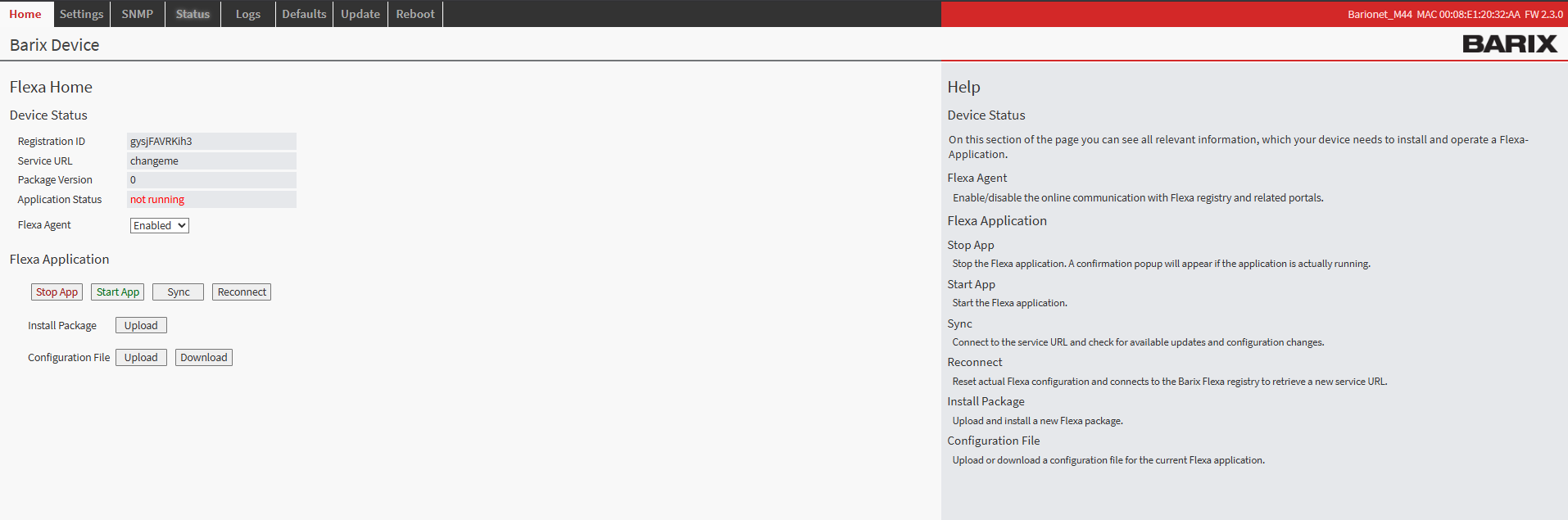
Barionet M44 User Interface
Step 2: Upload the Application Package
-
Navigate to the HOME tab in the main menu
-
Locate the "Upload" button next to “Install Package” within the page
-
Click the file selection button and browse to the “package.zip” which was downloaded from this page
-
Choose an appropriate version number for tracking purposes (this can be any number you prefer for identification)
-
Click the UPLOAD button to begin the installation process
Step 3: Device Reboot and Verification
After the upload completes, your Barionet device will automatically initiate a reboot sequence. This reboot is necessary to properly integrate the new application into the system. The reboot process typically takes 30..40s
-
Wait for the device to complete its reboot cycle
-
Reconnect to the web interface using the same IP address and credentials
-
Navigate back to the HOME tab
-
Verify that the Sendspin Player application appears with a status of "running"
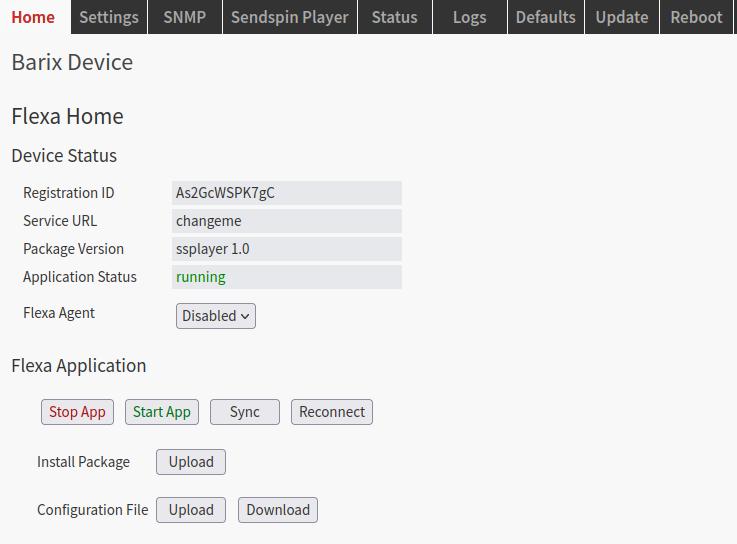
LX400 Home Tab
Configuration Overview
Once successfully installed, the Sendspin Player application configuration interface becomes available through the Sendspin Player tab in your device's web interface. This dedicated configuration page provides access to all settings necessary to establish communication between the device and the Sendspin server.
The configuration system is designed to be intuitive while providing the flexibility needed for complex installations. Each setting includes helpful descriptions and validation.
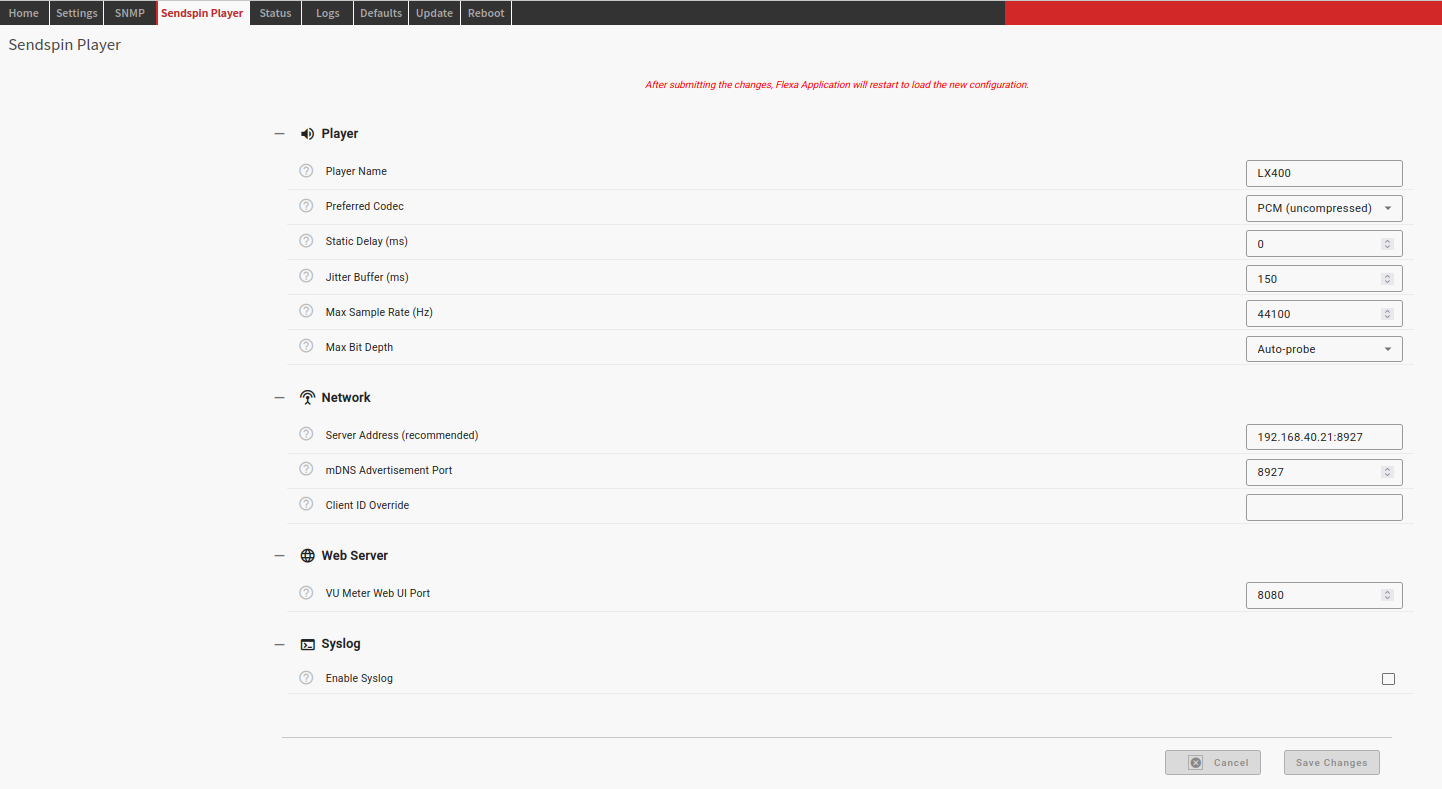
Sendspin Player Configuration Tab
Configuration
Player
|
Parameter |
Description |
Default |
|
Player Name |
The name shown for this player on the Sendspin server. Leave blank to use the device's own hostname-based identity. |
Device hostname |
|
|
|
|
|
Preferred Codec |
The codec requested from the server. PCM is uncompressed and always safe; FLAC is lossless and uses less bandwidth. |
PCM |
|
|
|
|
|
Static Delay (ms) |
Extra playback delay, useful for compensating for downstream hardware/amplifier latency. Leave at 0 unless you have a specific reason to add delay. |
0 |
|
|
|
|
|
Jitter Buffer (ms) |
How much audio is buffered ahead of playback. Increase this on an unreliable network to reduce dropouts; decrease it for lower latency on a solid network. |
150 |
|
|
|
|
|
Max Sample Rate (Hz) |
Caps the sample rate requested from the server. Leave at the default — this value is deliberately not auto-probed, since this hardware's capability auto-detection can't be trusted and 44100 Hz is the confirmed-correct rate for this device's DAC. |
44100 |
|
|
|
|
|
Max Bit Depth |
Caps the bit depth requested from the server. Auto-probe is fine to leave as-is. |
Auto-probe |
Network
|
Parameter |
Description |
Default |
|
Server Address |
Strongly recommended to set this explicitly — this build's automatic server discovery (mDNS) has a known bug and can fail to find a server that's actually reachable. Setting the address directly bypasses that entirely. |
|
|
|
|
|
|
mDNS Advertisement Port |
Only relevant if Server Address is left blank (relying on auto-discovery). Not used otherwise. |
8927 |
|
|
|
|
|
Client ID Override |
Normally left blank — the app generates and persists its own stable client identity automatically. Only set this if you specifically need to force a particular identity. |
auto |
Web Server
|
Parameter |
Default |
Description |
|
VU Meter Web UI Port |
The port for the live VU meter page (see below). |
8080 |
Syslog
|
Parameter |
Description |
Default |
|
Enable Syslog |
Forward the app's logs to a remote syslog server. |
off |
|
|
|
|
|
Syslog Host / Port |
Only used when syslog is enabled. |
|
Vu-Meter page
Open <http://<device-ip>>:8080/ in any browser on the same network to see a live VU meter for this player — moving bars for left/right channels, with peak-hold markers and color zones (green below -12 dB, yellow from -12 dB, red from -3 dB).
The page header also shows a status dot that mirrors the device's own status LED exactly (see below) — useful for checking status remotely without needing to be in front of the device.
The page works in both light and dark mode (toggle in the top-right corner), and updates live with no need to refresh.
Status Led
The device's right-hand LED shows the player's current state at a glance.
|
Led |
Meaning |
|
Red |
Not connected to the server. This is also the state at startup, before the first connection succeeds. |
|
Solid green |
Connected to the server, but no audio is currently playing. |
|
Slow blinking green |
Connected and actively playing audio. |
|
Fast blinking green |
Connected, but muted. |
Software Disclaimer
IMPORTANT:
This software application ("Software") is provided "AS IS" without warranty of any kind, express or implied, including but not limited to the warranties of merchantability, fitness for a particular purpose, and non-infringement. In no event shall the author, developer, or distributor be liable for any claim, damages, or other liability, whether in an action of contract, tort, or otherwise, arising from, out of, or in connection with the Software or the use or other dealings in the Software.
Use at Your Own Risk: The user assumes all responsibility and risk for the use of this Software. The author makes no representations or warranties regarding the accuracy, reliability, completeness, or timeliness of the Software or its suitability for any particular purpose.
No Support Obligation: The provision of this Software does not create any obligation to provide technical support, maintenance, updates, enhancements, or modifications. The Software is provided for educational and reference purposes only.
Third-Party Dependencies: This Software may utilize third-party libraries and components. The user is responsible for ensuring compliance with all applicable licenses and terms of use for such dependencies.
Network and Security: The user is solely responsible for implementing appropriate security measures and network configurations. The author is not responsible for any security vulnerabilities, data breaches, or network disruptions that may result from the use of this Software.
Compliance: Users are responsible for ensuring that their use of this Software complies with all applicable laws, regulations, and organizational policies in their jurisdiction.
Limitation of Liability: Under no circumstances shall the total liability of the author exceed zero dollars ($0.00) for any damages arising out of or related to the use of this Software.
By using this Software, you acknowledge that you have read, understood, and agree to be bound by the terms of this disclaimer.